
As an interior designer, you may already have valuable resources created for your audience — a free guide, a project checklist, or even a paid digital product. But without a dedicated landing page that clearly explains the value of that resource and guides visitors toward the next step, those offers often don’t perform as well as they could.
The result? You’re creating thoughtful, helpful content for your audience, but you’re not consistently capturing leads or making sales, leaving both potential business and revenue on the table. This is something a 4Dbiz Virtual Marketing Assistant can help with. By creating focused, high-converting landing pages for your lead magnets and digital products, we can help build your email list, support inquiries or sales, and strengthen your overall marketing funnel.
How does 4Dbiz support the creation and distribution of landing pages for lead magnets and digital products?
Our Virtual Marketing Assistants handle the full creation, publishing, and distribution of landing pages, so they are optimized and positioned to capture and nurture new leads or make sales, for your business.
Here’s How We Support You:
Offer and Funnel Alignment
We clarify the purpose of your landing page, whether it’s for a lead magnet download, newsletter sign-up, discovery call booking, or digital product purchase, and align it with your broader marketing funnel so the next step for your audience is clear and intentional.
Landing Page Copywriting and Structure
We write clear, benefit-driven copy that explains the value of your offer, who it’s for, and what someone will receive after opting in or purchasing. Each page is structured to guide visitors toward action while still feeling aligned with your brand and client experience.
SEO and AIO Best Practices
We optimize the content, page titles, meta descriptions, headings, and image alt text with SEO and AIO best practices to give your landing page a better opportunity to be discovered through search results.
Design Coordination and Brand Alignment
We format and build landing pages to match your studio’s brand and website experience. Whether it lives directly on your website or as a standalone page, we ensure it looks polished, cohesive, and consistent with your existing design and messaging.
Form, Integration, and Delivery Setup
A landing page only works if it connects properly to your systems. We can set up opt-in forms, confirmation messaging, automated delivery emails, tagging/segmentation, and redirects so leads or purchases flow seamlessly into your email marketing or CRM.
Publishing and Distribution Integration
We publish landing pages within your website platform or page builder and connect it wherever it needs to live — on your website or linked on social media, in emails, blog posts, or other campaigns. This ensures your landing page is not just created, but fully integrated into your marketing ecosystem and easy to share.
Conversion Optimization and Refinement
As data comes in, we can make strategic recommendations to improve performance over time such as refining headlines, call-to-action placement, messaging clarity, and overall flow to help increase conversions and lead capture.
General Process Questions
What is a landing page, and how is it different from a regular website page?
A landing page is a focused page built for one goal: to convert visitors into a lead or customer. Unlike a general website page that may have multiple navigation options, a landing page is designed to guide someone toward a single action like downloading a lead magnet, joining your email list, or purchasing a product. It eliminates distractions and improves conversion rates.
What types of landing pages can my Marketing Assistant create?
Your Marketing Assistant can create landing pages for any type of lead magnet or digital product such as guides, checklists, floor plans, newsletter sign-ups, and more. If you have an offer you want to promote with a clear next step, it’s a strong candidate for a landing page.
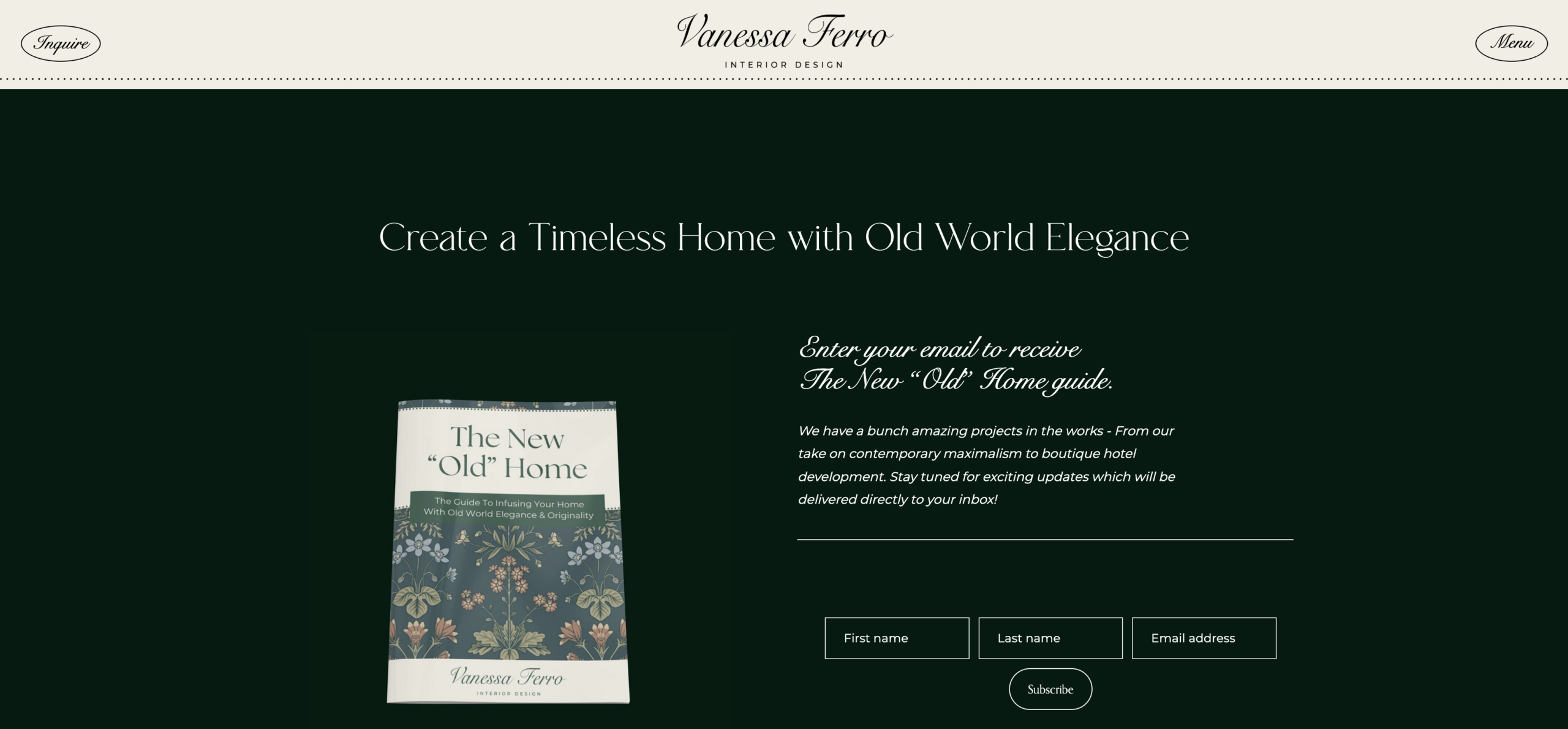
Lead Magnet by Vanessa Ferro Interior Design. Lead Magnet and Opt-In Page Designed by 4Dbiz.
Will the landing pages my Virtual Assistant creates look and sound like my brand?
Absolutely! During onboarding, we review your brand guidelines, website copy, marketing assets, and any other examples so your Marketing Assistant understands your brand voice and visual style. All landing pages will be designed and written to reflect your studio’s aesthetic and voice, whether that’s warm and conversational, elevated and editorial, or clean and minimal.
Will my Marketing Assistant optimize my landing pages for SEO, or is their primary use for social media and ads?
Many landing pages are primarily used for traffic from social media, ads, blogs, and email marketing. But for long-term visibility through search, we recommend incorporating SEO and AIO best practices to support discoverability.
Do landing pages work for interior designers even if I don’t sell digital products?
Yes, landing pages are one of the best ways to capture leads before someone is ready to inquire. A strong lead magnet landing page builds your email list allowing you to nurture potential clients over time, and creates a pipeline of future inquiries — without requiring you to sell anything.
Will I be able to review the landing pages my Virtual Assistant creates before they go live?
Yes, your Marketing Assistant can draft your landing page copy in a shared document first and/or build the page as a draft inside your website platform. You’ll be able to review, request revisions, and give final approval before anything is published.
Can my Marketing Assistant optimize existing landing pages if I already have them?
Absolutely. If you already have landing pages, your Marketing Assistant can review and optimize them. This may include improving keyword usage, page structure, formatting, and content clarity.
How long does it take for a landing page to start generating leads?
If you’re driving traffic from social media or ads, a landing page can begin generating leads or sales very quickly after it’s live. If the landing page is optimized for search, visibility through SEO and AIO is not immediate but builds gradually over time.
Will landing pages require my Virtual Assistant to perform ongoing updates or maintenance?
Occasional updates are helpful. As your offers evolve, your Marketing Assistant can refresh your landing page copy, update visuals, adjust calls-to-action, or refine messaging based on performance. Small updates can make a significant difference over time.
Tools and Technology Questions
What technologies are most common for creating and distributing landing pages?
Interior designers use various website platforms, page builders, email marketing tools, and more to create and distribute landing pages. Below are some of the most commonly used tools:
Website Platforms and Page Builders
Used to build, design, and publish landing pages:
- WordPress (Elementor, Divi, Gutenberg)
- Showit
- Squarespace
- Wix
Email Marketing Tools
Used to collect leads and deliver your resource automatically:
- Flodesk
- Mailchimp
- ActiveCampaign
- ConvertKit
CRM Platforms
Sometimes used to connect an opt-in workflow or inquiry step:
- Dubsado
- HoneyBook
- Studio Designer
- DesignFiles
SEO and Analytics Tools
Used when optimizing for search visibility and tracking performance:
- Google Search Console
- Google Analytics
- Google Keyword Planner
- Ubersuggest, SEMrush, or Ahrefs
Content Drafting and Collaboration Tools
Commonly used to draft page content, structure outlines, collect notes, and collaborate on edits before uploading to your website.
- Google Docs
- Notion
Image Creation
Used to design visuals that are on brand and visually polished.
- Canva
Can my Marketing Assistant build landing pages in the platforms I already use?
Yes, your Marketing Assistant can work directly within the platforms you already use. During onboarding, we’ll get access to your website and any related tools your Assistant will need for creating and distributing landing pages.
If I don’t have a lead magnet or digital product yet, can my Marketing Assistant help me create one?
Absolutely. Your Marketing Assistant can support the creation of lead magnets or digital products and build the landing pages to go with them.
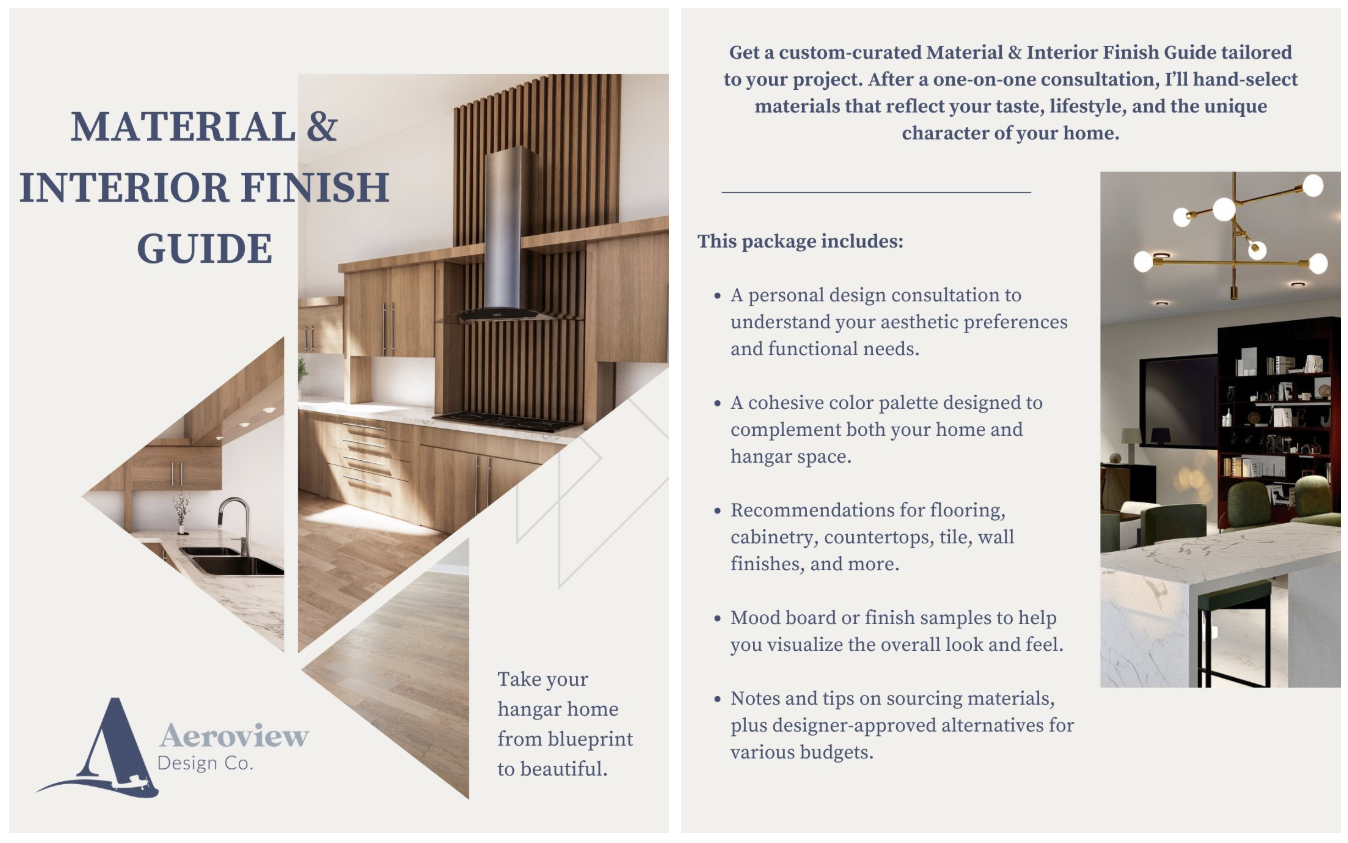
Digital Product by Aeorview Design Co. Designed by 4Dbiz.
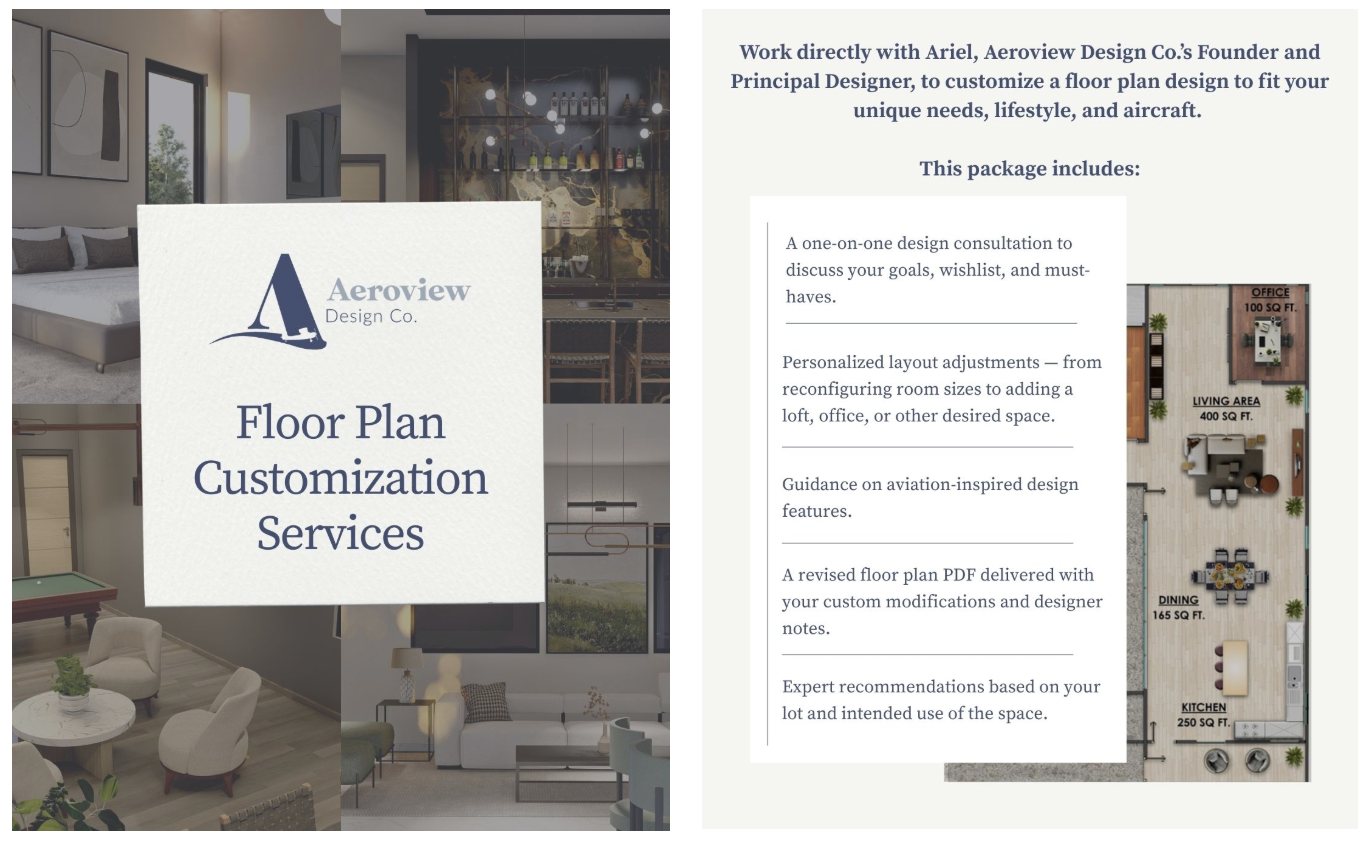
Digital Product by Aeorview Design Co. Designed by 4Dbiz.
How does the creation and distribution of landing pages get delegated?
All delegation happens through the 4Dbiz Portal, our secure, custom-built platform that keeps your workflow organized and communication seamless. This is where you can communicate directly with your dedicated Marketing Assistant to delegate tasks, share project details, and track progress from start to finish.
Inside the Portal, you can:
Create and Assign Tasks
Submit new tasks with all the details your Virtual Assistant needs including descriptions, deadlines, step-by-step directions, and any supporting files.
Keep Communication Organized
Each task has its own built-in Task Discussion so conversations, updates, and clarifications stay attached to the right project. No more digging through emails or scattered chats.
Store Logins and Files Safely
Your login credentials and other important details are stored securely in one place, giving your Assistant quick access without compromising security.
Stay Streamlined and In Control
Because every file, message, and update lives inside the corresponding task, you always know exactly where things stand without having to chase down information.
What do I need to provide to get my Marketing Assistant started creating and distributing landing pages for lead magnets and digital products?
We’ll gather a few key details during onboarding to ensure your Marketing Assistant has the access, context, and direction needed to create and distribute landing pages that are on-brand and generate results.
During onboarding, we’ll ask you to provide:
Your Offer Details
The lead magnet or digital product you’re promoting, what it includes, who it’s for, and the action you want the visitor to take.
Brand Assets and Guidelines
Your logo, brand colors, fonts, imagery preferences, tone of voice, and any brand guidelines.
Website and Platform Access
Access to your website or page builder, and other relevant platforms like your email marketing or CRM tools. All login details are securely stored within the 4Dbiz Portal.
Traffic Plan
Where you plan to distribute the landing page — your website, social media, ads, etc.
What does the onboarding process look like?
Working with our Marketing Team begins with a one-time Onboarding process led by our Fractional CMO, Evelyn. This will include an introductory meeting with your dedicated Marketing Assistant.
Here’s what to expect:
- Length of Process: The Marketing Onboarding process typically takes 5-10 days, depending on your schedule and availability.
- Support: You will have both executive and assistant support. During Onboarding, we will get your Marketing Assistant aligned on your specific processes and goals so they can begin working on your first marketing tasks.
- Deliverables: You’ll receive a Custom Marketing Proposal tailored to your marketing budget and goals, so everyone operates from the same playbook moving forward.
What’s the turnaround time before my Marketing Assistant can take over the creation and distribution of landing pages for lead magnets and digital products?
After onboarding, your Marketing Assistant will be fully equipped to take over the creation and optimization of landing pages for lead magnets and digital products.